
Vital Signs Monitor: How Readings Guide Outpatient Care
11/02/2026 05:17:27
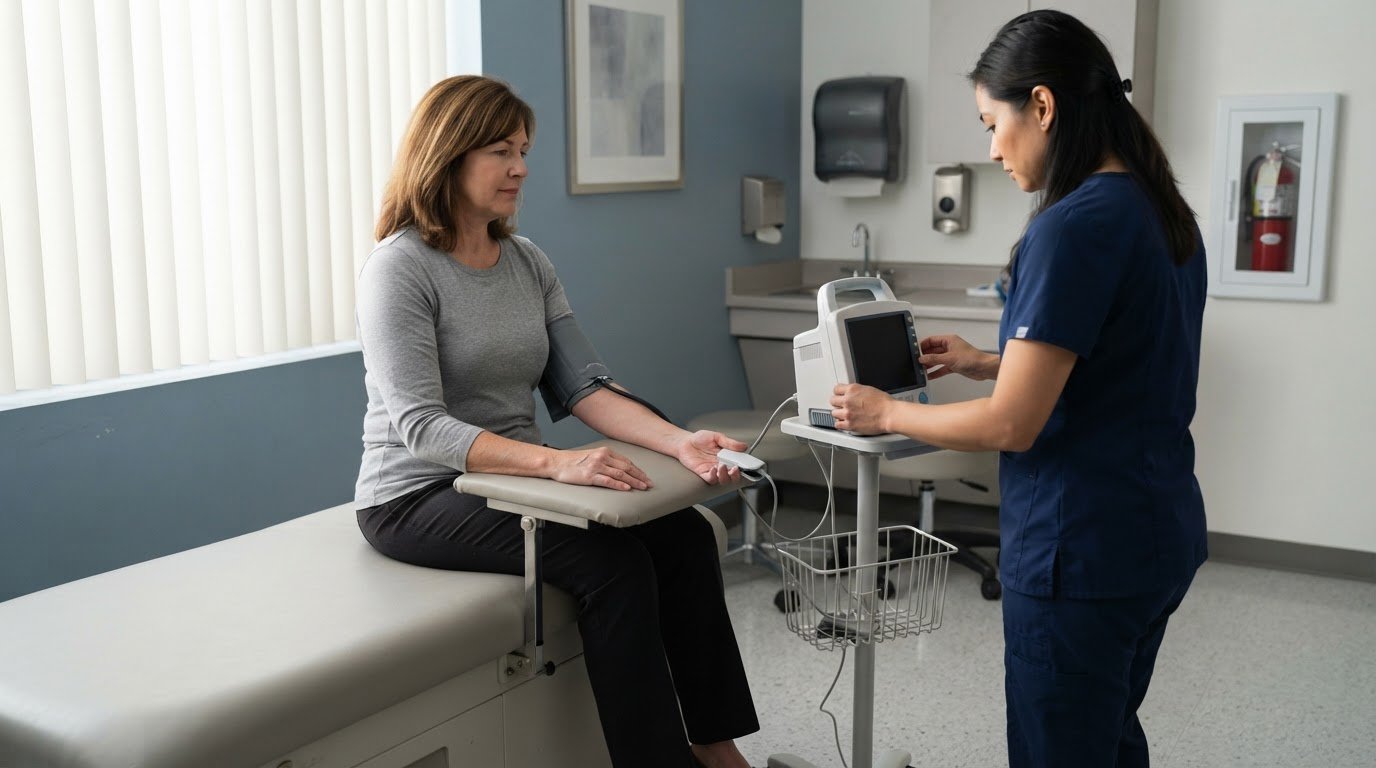
A set of vital signs is a snapshot, not the whole clinical picture. A non-invasive vital signs monitor for outpatient clinic use measures readings such as blood pressure, heart rate, oxygen saturation (SpO2), and temperature; some monitors also measure respiratory rate. These readings give care teams practical information to consider alongside a patient’s symptoms and examination.
A vital signs monitor for outpatient clinic use should provide clear, useful readings, but results can vary with a patient’s condition and how measurements are taken. Accuracy and a smooth workflow matter because staff need readings they can interpret and document during a visit.
This article explains what these monitors measure, why readings can vary, and how measurement technique and clinic workflow affect their usefulness. It also covers what to consider when selecting equipment for routine exams and other outpatient care, so readings support clinical decisions without being treated as the whole story.
Key Takeaways
- Understand which readings a non-invasive monitor can capture and how they fit into an outpatient assessment.
- Consider changes in a patient’s condition alongside readings, rather than treating one measurement as the full clinical picture.
- Learn how measurement technique and conditions can affect the reliability of non-invasive readings.
- See why temperature results depend on how and where they’re measured.
- Identify interface and workflow features that can help staff review and document readings efficiently.
What is a Non-Invasive Vital Signs Monitor?
A non-invasive monitor collects measurements without entering the body, using sensors or cuffs placed on the patient. In outpatient care, its value depends on which readings it captures and how staff use them.
Patient Monitors and Vital-Sign Monitors
A vital signs monitor captures selected measurements, while a patient monitor may combine those readings with ongoing observation. The distinction matters when matching equipment to a clinic’s purpose: a spot check during an exam differs from monitoring throughout a procedure.
Outpatient options include spot-check devices and multi-parameter patient monitors, with measurements varying by model. No single brand suits every clinic, and specialized medical device suppliers such as GetMedicalDevice offer access to a wide range of clinical technologies. Choose equipment that fits the readings needed and the team’s workflow.
In the United States, FDA requirements and certifications depend on a device’s intended use and regulatory status. Review the specific monitor’s labeling and manufacturer documentation rather than assuming one certification applies universally.
Automated and Real-Time Vital-Sign Collection
Automated collection lets a monitor acquire selected readings through connected sensors, reducing manual data entry. Real-time collection updates readings as the device measures them, which can help staff notice changes during observation.
The readings a vital-sign monitor should measure depend on the clinical task. Common options include blood pressure, heart rate, oxygen saturation (SpO2), temperature, and respiratory rate; a clinic can compare this list with the measurements required for routine exams or procedural monitoring.
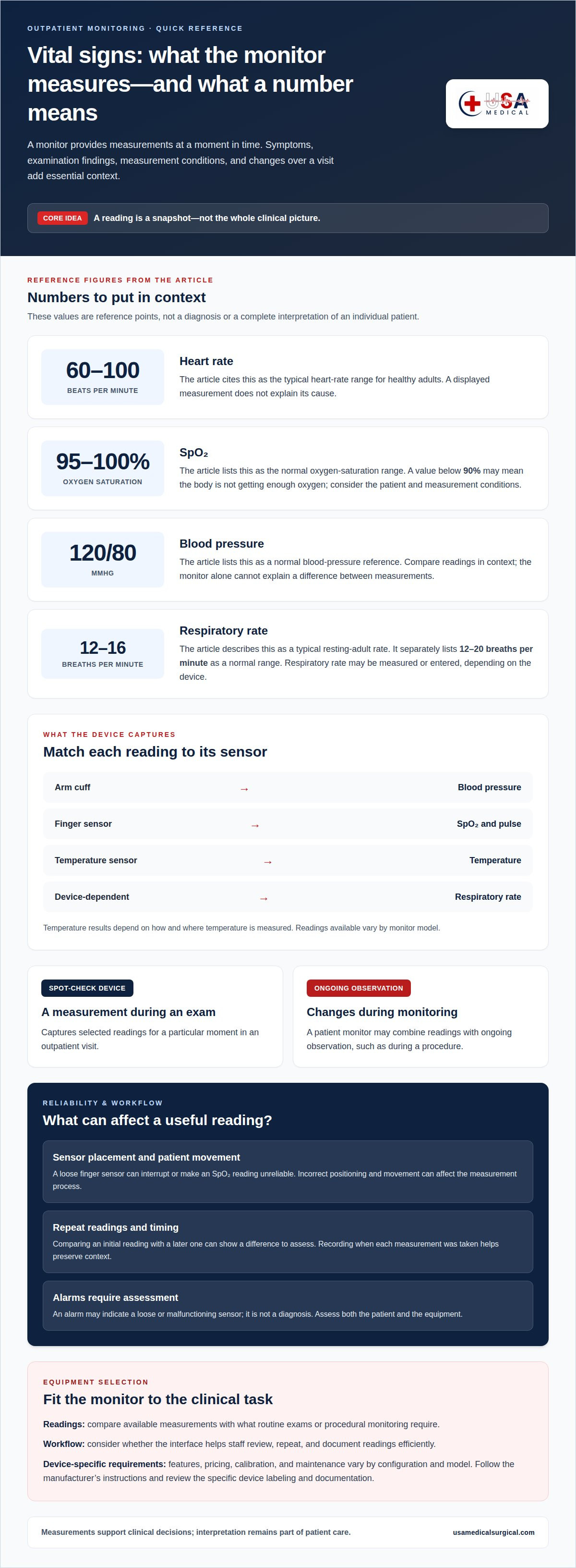
Healthy adults typically have a heart rate of 60 to 100 beats per minute, according to the U.S. National Library of Medicine. That range gives context, but a monitor displays a measurement rather than explaining its cause.
How Vital-Sign Monitors Work
A monitor pairs each measurement with a sensor: an arm cuff measures blood pressure, and a finger sensor can measure SpO2 and pulse. Temperature measurement uses a temperature sensor, while respiratory rate may be measured or entered depending on the device.
Staff position the sensor, start or observe the measurement, then review the displayed result. For example, a loose finger sensor can interrupt an SpO2 reading. Correct placement helps the device collect a usable measurement.
Clinic-grade pricing varies with the measurements, configuration, and intended workflow, so compare the features rather than assuming one typical price. Calibration and maintenance schedules also depend on the monitor. Follow the manufacturer’s instructions for the specific model and required checks.
Patient monitoring and changing conditions
A monitor records measurements at a particular moment, while outpatient care also depends on how readings change during a visit. Repeating a measurement can help staff compare results; symptoms, examination findings, and measurement circumstances provide important context.
For reference, the U.S. National Library of Medicine lists 95-100% as the normal oxygen saturation range. It also lists 120/80 mmHg as a normal blood pressure. These figures offer context, not a complete interpretation of an individual patient’s condition. A result should be considered alongside other readings and the reason monitoring is taking place.
Patterns can be more informative than a single display. For example, staff may compare a patient’s initial blood pressure with a later reading taken during the same visit. A difference gives the care team information to assess, but the monitor alone cannot explain it. Recording when each measurement was taken preserves that context.
Measurement conditions matter, too. Patient movement can affect the process, and an incorrectly positioned sensor may produce a reading that staff need to review. If an oxygen sensor becomes loose, the displayed result may be interrupted or unreliable. Staff can check its placement and assess the patient before interpreting the reading.
An alarm calls for attention; it is not a diagnosis. It may sound because a sensor has come loose or is not working properly. Staff should assess the patient and equipment rather than assume the alarm proves a change in condition. In a monitored setting, if an alarm sounds and no one checks on the patient, the patient should use the call system to contact a nurse.
Useful monitoring depends on linking each measurement to the patient and the time it was collected. A reading taken before an examination may serve a different purpose from one collected while staff observe a changing condition. Clear documentation helps the care team distinguish a new result from an earlier one and decide on appropriate follow-up.
For outpatient teams reviewing equipment, consider how the monitor supports repeat measurements and makes changes visible to staff. A vital signs monitor can support this workflow by bringing selected readings together for review. The device contributes measurements; clinical interpretation remains part of patient care.
Additional reference ranges can help staff frame measurements without treating them as conclusions. Blood pressure reference ranges can help frame measurements, but they are not conclusions on their own. These figures can support comparison during a visit, but the patient’s symptoms, measurement conditions, and other findings remain important when deciding whether a result needs follow-up.
A resting adult typically breathes 12 to 16 times per minute, while the page lists 12-20 breaths per minute as the normal respiration-rate range. An oxygen saturation below 90% may mean the body is not getting enough oxygen. A reading near or outside a reference range should be considered in context, and staff can repeat a measurement or check the equipment when appropriate. Any concerning change should be assessed with the patient’s overall condition in mind, rather than interpreted from one display alone.
Accuracy of non-invasive monitoring
Accuracy depends on both the monitor and how staff collect each reading. A blood pressure result, for example, can be difficult to interpret if the cuff or patient’s position changes between measurements. Reliable use starts with matching the sensor to the measurement, positioning it correctly, and reviewing the display before recording the result.
Automated monitors reduce manual entry, but they don’t remove measurement limits. Patient movement can interfere with a measurement, while a loose sensor can disrupt the signal. A reading may be incomplete or misleading if staff accept it without checking the patient and equipment.
For a blood pressure measurement, staff can check that the cuff is placed as directed and stays secure during the cycle. If a result seems inconsistent with the patient’s presentation, review the setup and repeat the measurement. A second reading provides another observation, not proof of why results differ.
For pulse and oxygen saturation, sensor contact matters. A finger sensor that shifts during measurement may interrupt the signal or produce a result that needs review. Staff can check the fit, ask the patient to remain still, and repeat the measurement. They should also consider whether the displayed value matches what they observe.
Accuracy also depends on the device’s condition and setup. Follow the manufacturer’s instructions for the monitor, cuffs, sensors, and accessories. Keep components matched to the device and replace damaged or worn parts as directed. A sensor that won’t connect or a cuff that cannot stay in place can compromise the measurement process.
Use a consistent process to collect and document readings. Record each measurement with the relevant patient and visit context, and note whether staff repeated it. For example, documenting that a blood pressure reading was repeated after adjusting the cuff distinguishes the later result from the first attempt.
Automated readings have limits: they don’t explain why a value appears, replace clinical assessment, or guarantee a usable result when sensors are poorly positioned. Staff need to interpret readings alongside the patient’s condition and check questionable measurements before relying on them.
In practice, accuracy is as much a workflow issue as an equipment issue. Clear placement, correct accessories, consistent collection, and careful review help outpatient teams use monitor readings as useful information rather than treating the display as a diagnosis.
Body temperature readings
Temperature adds a separate measurement to an outpatient assessment. The U.S. National Library of Medicine lists 36.1-37.2°C (97-99°F) as the normal core body temperature range. A monitor’s displayed value needs to be understood in relation to how the temperature was measured. Staff should use the device’s designated method and interpret the result within the patient’s broader assessment.
Temperature readings may be collected using different measurement sites and device methods. A reading from one site should not automatically be treated as identical to one taken another way. For example, comparing an oral measurement with a reading from a different site may complicate interpretation. Documenting the method helps staff understand what each value represents.
For an outpatient visit, staff can follow a consistent sequence: select the temperature function, prepare the required sensor, collect the measurement, and review the result. The monitor’s instructions guide the setup. If the sensor isn’t positioned as directed or the process is interrupted, address the setup before relying on the displayed value.
Units matter, too. A display may show Celsius or Fahrenheit, so staff should check the unit beside the result before recording it. A value entered without its unit can be harder to compare with a later measurement. Recording the unit and method together supports clearer documentation throughout the visit.
Temperature provides useful information, but it doesn’t explain its cause. Staff consider the reading alongside symptoms, examination findings, and other measurements. If a result differs from the patient’s presentation, they can review the method and repeat the measurement according to the device instructions. A repeated result adds context; it doesn’t independently establish a diagnosis.
Consistency helps when a care team reviews temperature over time. If staff use the same method and record the measurement site, results are easier to compare. A change in method between visits can affect how values should be understood. Clear notes help another clinician distinguish a new result from a difference in measurement technique.
Temperature monitoring also depends on practical workflow. Staff need access to the appropriate sensor, a clear display, and a way to record the result with its unit and method. During a routine exam, collecting temperature alongside other observations can help keep the visit record organized. The monitor supplies a measurement; clinical assessment gives it meaning.
A commonly cited normal body temperature is 98.6°F. This reference can help frame a reading, but it should not replace attention to the measurement method, the patient’s presentation, or the other information gathered during the visit. Staff can record the value with its unit and site so that the result remains clear to anyone reviewing the notes.
When interpreting a measurement, the clinician can consider whether the device was used as directed and whether the result fits the broader assessment. If it seems inconsistent with the patient’s presentation, reviewing the setup and repeating the measurement according to the device instructions can provide more context.
Clinician workflow and user interface
A monitor’s interface shapes how staff move from setup to a documented reading. In a busy outpatient room, clearly labeled controls help a clinician select the intended measurement and spot an incomplete result. A display that separates blood pressure, pulse, oxygen saturation, and temperature makes it easier to review each value without confusing one parameter with another.
Workflow begins before measurement. Staff identify the patient, choose the required parameters, and prepare the appropriate sensor or cuff. During collection, the screen should make the active measurement and any interruption easy to recognize. Afterward, staff review the values and units, then record them in the visit documentation. This sequence helps keep readings from the same assessment together.
Alarms and status messages need practical attention. A prompt may indicate a measurement issue, such as a sensor connection problem, rather than a change in the patient. Staff should read the message, assess the patient, and inspect the relevant equipment before responding. For example, if a pulse sensor slips, repositioning it and repeating the measurement can help clarify whether the display reflects a usable signal.
Training should cover the monitor’s controls, sensor placement, result review, alarm response, and documentation. Staff also need to follow the manufacturer’s operating and cleaning instructions. Between patients, clean reusable contact surfaces and handle accessories according to those instructions and the clinic’s infection-control procedures. This supports a consistent process without assuming all monitors or accessories are cleaned identically.
Interface design also affects handoffs. A clinician finishing an exam should be able to distinguish a new result from a previous reading and identify any measurement that needs review. Clear labels and visible units help prevent transcription mistakes. If a screen presents several values together, staff can review them in a consistent order before entering them in the visit record.
When evaluating usability, consider the room layout and staff routine. A screen that is readable from the working position, accessible controls, and straightforward sensor connections can reduce unnecessary handling. Staff can practice a routine scenario, such as collecting blood pressure and pulse, then review whether each step and result is clear.
Explore vital signs monitors for outpatient care to compare equipment options for your clinic’s monitoring workflow. Pair the device’s interface with staff training and established cleaning procedures so each reading can be collected, reviewed, and documented consistently.
USA Medical and Surgical Supplies: Blood Pressure Devices
USA Medical and Surgical Supplies offers Blood Pressure Devices for outpatient teams selecting equipment for routine measurements. If your clinic needs blood pressure equipment or related diagnostic options, explore the available categories and choose products that fit your monitoring workflow.
The catalog also includes Dopplers, ECG Machines, and ECG Electrodes. These products support equipment needs beyond blood pressure measurement, while selection should reflect the readings and tasks your care setting requires. For a monitor that combines multiple vital-sign measurements, consider how its parameters and interface fit your workflow.
Visit usamedicalsurgical.com or contact USA Medical and Surgical Supplies to explore its Blood Pressure Devices.
Put Your Monitoring Plan Into Practice
Turn monitoring needs into a routine your team can apply across visits. Decide which measurements matter for each appointment type, who reviews the results, and where staff record them. Keep the process clear, from preparing the monitor to documenting readings that need review.
When selecting a vital signs monitor for an outpatient clinic, start with the intended workflow. Consider how the display presents readings, how sensors fit into the room’s routine, and how the device instructions support training and cleaning. A practical fit connects equipment, staff roles, and documentation rather than treating the monitor as a standalone purchase. Review the plan with the clinicians who will use it and identify gaps before changing equipment or processes.
USA Medical and Surgical Supplies can help you explore equipment options for your setting. Contact USA Medical and Surgical Supplies to take the next step with a clear plan.
Frequently Asked Questions
How do you choose a vital signs monitor for a small outpatient clinic?
Choose a vital signs monitor for an outpatient clinic by matching its measurement options to the visits your team handles. Consider which parameters staff need together, how the interface fits the exam-room routine, and whether the required sensors are practical to store and clean. For example, specialized outpatient providers like Local Foot Doc conducting routine assessments may prioritize straightforward spot checks, while a setting with procedural monitoring may need a broader set of readings.
How accurate and reliable are outpatient vital signs monitors?
Reliability depends on the device, the condition of its accessories, and consistent use. Follow the manufacturer’s instructions, use compatible sensors, and ensure staff know how to interpret device prompts. If a result conflicts with the patient’s presentation, reassess the setup and repeat the measurement as appropriate. A monitor provides measurements, not an explanation; clinical teams interpret readings alongside other assessment information.
Where can outpatient clinics buy or lease vital signs monitors in the United States?
Clinics can buy vital signs monitors through USA Medical and Surgical Supplies’ online storefront, which serves customers across the United States. The company’s stated purchasing model is direct product sales, rather than equipment rental. Browse the diagnostic equipment category to review available options and place an order online. Consider whether your clinic needs an outright purchase or a separate leasing arrangement when planning equipment acquisition.